Coloring Games: Color & Paint
- 4.4
- Rating
- 100.00M
- Installs
- Free
- Price
 Analysis by App-foxy
When I opened Coloring Games: Color & Paint, I expected a simple digital coloring book, but the app feels more useful when treated as a small activity kit for children. It combines coloring, painting, neon-style drawing, and educational games in one child-friendly package. That mix makes it a practical choice for parents who want a screen activity with a little more purpose than endless tapping, although it is not a replacement for a full learning platform or a real art program.
The game comes from RV AppStudios and is free to use. It belongs to the educational game category, carries an Everyone age rating, and works on devices using Android 6.0 or later. Its current version is 1.9.0. Those details matter because the app is clearly aimed at shared family use: a child can explore it independently, while an adult can sit nearby and turn the pictures and mini-games into a short learning session.
My overall impression is positive, especially for younger children who enjoy visual activities. The important question is not whether it has the largest collection of drawing tools or the deepest lessons. It does not need to win on those points. The better question is whether it gives a child an easy, low-pressure way to practice colors, recognition, and hand control. In that narrower role, it makes a convincing case.
In-Depth Coverage of Coloring Games: Color & Paint
How I would decide whether it fits a child
I would start with the child’s age, patience, and reason for using the app. A child who wants to color immediately will probably appreciate the direct layout more than a child looking for a complex drawing studio. The app is built around quick visual interaction, so it works best when the goal is a short activity after school, during travel, or while waiting somewhere.
The second consideration is the balance between open creativity and guided learning. A completely free drawing app gives a child a blank canvas and more control, but it can also feel intimidating or become repetitive. This game takes the opposite approach: it offers a more structured path through coloring and educational play. That structure is helpful for children who need a starting point, but it may feel restrictive to older kids who already know exactly what they want to create.
I also look at how much adult involvement is realistic. In my experience, the app is most valuable when a parent occasionally asks questions while the child plays: “Which color did you choose?” “What happens if you combine these ideas?” or “Can you find another picture with the same color?” That turns passive screen time into conversation and practice. If the app is being used only as a silent distraction, much of its educational value is left unused.
There is also a device question. Coloring is easier on a reasonably sized touchscreen because small controls can be awkward on a compact phone. A tablet is the more comfortable choice for longer sessions, while a phone remains suitable for brief play. I would not choose this game for a child who needs a keyboard, mouse, or precise stylus workflow, because its appeal comes from simple touch interaction rather than detailed digital illustration.
What the first session feels like
The strongest part of the first session is the low entry barrier. A child does not need to understand a complicated tool palette before beginning. The coloring-book idea is familiar, and the addition of painting and neon drawing gives the experience enough variety to prevent it from feeling like one repeated task. That matters with young players, who often move on quickly if an activity demands too much explanation.
I found the variety more useful as a way to manage attention than as a collection of separate art modes. A child may start with ordinary coloring, lose interest, and then become curious about the brighter neon drawing style. Later, an educational game can provide a change of pace. This makes the app easier to use in short bursts because the adult can switch activities instead of abandoning the session entirely.
The educational element should be understood realistically. This is learning through repetition, recognition, and play, not a complete curriculum. It can reinforce basic ideas, but parents should not expect it to teach a subject from the beginning or measure progress like a dedicated educational course. I see it as a supporting activity that works best alongside conversation, books, physical toys, and hands-on drawing.
Where the combination of art and learning works best
The app’s clearest strength is that it connects learning with an action children already enjoy. Instead of presenting every lesson as a quiz, it gives the child something visual to do. For a child who resists formal practice, that can make a difference. The act of choosing colors and completing a picture creates a reason to stay engaged long enough for an adult to reinforce vocabulary and recognition.
A useful routine is to let the child choose a picture, finish it without interruption, and then talk about the result. Ask the child to name the colors, describe the picture, and explain why a particular color was selected. This is a simple but non-obvious way to extend the app beyond the screen. The game supplies the prompt; the adult supplies the richer language practice.
Another good workflow is to alternate modes rather than letting the child remain in one activity for the entire session. A few minutes of coloring can be followed by neon drawing, then an educational game. This prevents the experience from becoming mechanical and gives the child a chance to move between guided and creative play. I would use that approach during a short daily routine rather than leaving the app open indefinitely.
You May Also Like

 Samsung Music
Samsung Music’s Quiet Strength Is Playing What You Already Own
Its reach comes less from spectacle than from dependable access to a personal library. That simplicity is both the app’s strongest retention engine and its ceiling.

 AccuWeather: Weather Radar
AccuWeather Review: A Quick, Clear Forecast for Everyday Decisions
For everyday plans, the best forecast is the one you can understand quickly. AccuWeather makes rain timing, radar, and local conditions easy to act on, with a few trade-offs.

 Hill Climb Racing
Why Hill Climb Racing Still Turns Crashes Into One More Run
A tiny car, a bumpy hill and one more upgrade: Hill Climb Racing keeps resurfacing because its simple chaos makes every near-miss feel personal.

 AliExpress - Shopping App
AliExpress Makes Global Shopping Feel Personal, but Shoppers Bear the Risk
AliExpress turns a global marketplace into a pocket-sized discovery engine. Its reach is useful, its shopping loop compelling, and its trade-offs easy to miss.

 Lords Mobile: Kingdom Wars
Lords Mobile Is a Kingdom-Building Routine, Not a Quick Match
A case-by-case verdict on the building, battles, device demands, and social commitments that make Lords Mobile rewarding for some players and exhausting for others.

 PDF Scanner app - TapScanner
TapScanner Makes Paperwork Easier to Capture, Check, and Share
TapScanner makes scanning with a phone feel less like a rescue operation and more like a dependable step in getting work done. Its capture tools are useful, though not flawless.
More From Our News Desk



The neon drawing option is especially useful as a motivation tool. It does not necessarily make the child a better artist, but it changes the visual reward and can encourage experimentation. A child who is cautious with ordinary coloring may be more willing to make bold marks when the result looks dramatically different. That is a small design choice, but it gives the app more staying power than a basic coloring book alone.
Where it is stronger than common alternatives
Compared with a physical coloring book, the game is more flexible for families who want several activities in one place. There is no need to carry crayons, choose a separate picture book, and then find another activity when attention fades. The digital format also makes switching between coloring, painting, and educational play immediate. For travel or waiting rooms, that convenience is a genuine advantage.
Compared with a plain coloring app, this title has a broader purpose. A basic coloring tool may be better for quiet, focused art, but it can become repetitive once the child has filled several pictures. Here, the educational games and alternate drawing style give parents more ways to redirect attention without opening another app.
Compared with a serious digital art application, this game is much easier for a young child to approach. There is less pressure to produce polished work, and the activity is not built around mastering professional controls. That simplicity is a benefit for beginners. It is also the reason an older child or aspiring artist may outgrow it and prefer an app with layers, detailed brushes, and more deliberate creative control.
Its scale is reflected in its audience reach: the game has passed 100 million installs and holds a 4.4 average rating from around 108 thousand ratings. I would not treat popularity as proof that it suits every family, but it does suggest that the basic concept is easy for many users to understand. The important takeaway is that it is designed for broad accessibility rather than a narrow group of advanced learners.
Small details that affect everyday use
One practical strength is the ability to use the app as a flexible time filler without preparing a lesson in advance. If a child has ten spare minutes, coloring can begin immediately. If there is more time, the adult can introduce the educational activities or ask the child to explain the finished picture. That makes it easier to fit into real family routines than an activity that requires setup and supervision from the first second.
At the same time, the app’s ease can become a weakness. When an activity is very accessible, a child may move quickly from one picture to another without thinking about the choices being made. I would avoid handing over the device with no context every time. A simple instruction such as “choose three colors and tell me where you used them” adds intention without turning play into homework.
Another trade-off is creative freedom. The coloring format gives children a clear starting point, but children who want to draw completely from imagination may eventually find the structure limiting. The neon mode helps, yet it does not change the basic fact that this is an educational coloring game rather than a full art studio. I would choose a more advanced drawing tool for a child who already spends time designing characters, scenes, or detailed illustrations.
The free price makes experimenting easy, which is important for families who are unsure whether a child will enjoy digital coloring. I can recommend trying it before committing to a paid art app or a larger subscription-based learning service. Still, “free” should not automatically mean it is the best long-term option. A family seeking a carefully sequenced learning program, deeper feedback, or a highly controlled creative environment may get more value elsewhere.
When another category may be the better choice
I would skip this game if the main goal is advanced artistic development. It is not the right destination for learning composition, perspective, digital painting technique, or professional illustration habits. A dedicated art application, especially one designed around a stylus, would be a better fit for that purpose.
I would also look elsewhere if a child needs formal academic progression. The educational activities can support early learning, but they should not be confused with a structured course that tracks skills from one level to the next. A specialized learning app may be preferable when parents want clear lesson sequences, practice records, or subject-specific instruction.
For children who become frustrated by bright effects or quick changes between activities, a physical coloring book may actually be calmer. Paper offers a different kind of focus, and it avoids the temptation to jump from coloring into another digital distraction. I would use this game as one option in a balanced routine, not as the only creative activity available.
There is also a difference between independent play and guided play. A child may be able to operate the app alone, but that does not guarantee meaningful learning. If the family wants an activity that teaches through direct explanation and correction, an adult-led exercise or an interactive lesson with clearer instruction may work better. This game is strongest when it complements adult encouragement rather than trying to replace it.
What switching from another option really involves
Moving from a physical coloring book to this game is easy in terms of setup, but the experience changes in important ways. The child gains variety and instant feedback, yet loses the tactile feel of paper and crayons. I would make the switch for travel, quick sessions, or a child who enjoys trying different visual effects. I would not make it a complete replacement if the child already enjoys cutting, drawing, and coloring with real materials.
Switching from a plain coloring app is also fairly straightforward because the basic interaction remains familiar. The main adjustment is learning to use the educational activities as part of the routine rather than treating the app as a single-purpose canvas. Parents should expect to spend a little time discovering which mode keeps their child engaged and which mode feels too repetitive.
Switching from a structured learning app may feel different in the opposite direction. This game is more relaxed and creative, but it may offer less of the progress-focused experience that parents associate with formal practice. I would choose it when motivation and variety are the immediate problems. I would keep the structured app when measurable progression is the priority.
The current version is 1.9.0, and the game has been available since November 6, 2019. That gives it a longer presence than a brand-new experiment, but I would still judge it by the child’s response rather than by its age or popularity. A good test is to use it over several short sessions and observe whether the child returns to different activities or simply repeats one action without interest.
My recommendation for parents and young players
I recommend Coloring Games: Color & Paint to parents looking for a free, approachable educational game that combines digital coloring with a few different ways to play. Its best audience is a young child who likes visual activities, benefits from simple structure, and enjoys switching between creative work and basic learning tasks. It is particularly convenient when a family needs a short activity that requires little preparation.
I would introduce it with a small plan rather than unlimited access. Choose one picture, talk about the colors, try a different drawing style, and finish with one educational activity. That routine makes the app feel purposeful while preserving the child’s freedom to explore. It also reveals quickly whether the child enjoys the learning side or only wants the visual effects.
My recommendation becomes more cautious for older children, advanced young artists, and families seeking a complete academic program. Those users may prefer a dedicated drawing app, a physical art kit, or a structured learning platform. The game is not weak because it lacks those things; it simply has a different job.
For the right child, that job is worthwhile. RV AppStudios has made a friendly game that lowers the barrier to creative play and gives parents several ways to turn coloring into conversation. The best reason to install it is not the number of activities, but the way a short coloring session can become a small learning moment. If that matches what you need, the free download makes it an easy option to try. If you want deep art tools or formal instruction, I would choose a more specialized alternative instead.
FAQs for Coloring Games: Color & Paint
01What features does Coloring Games: Color & Paint offer?
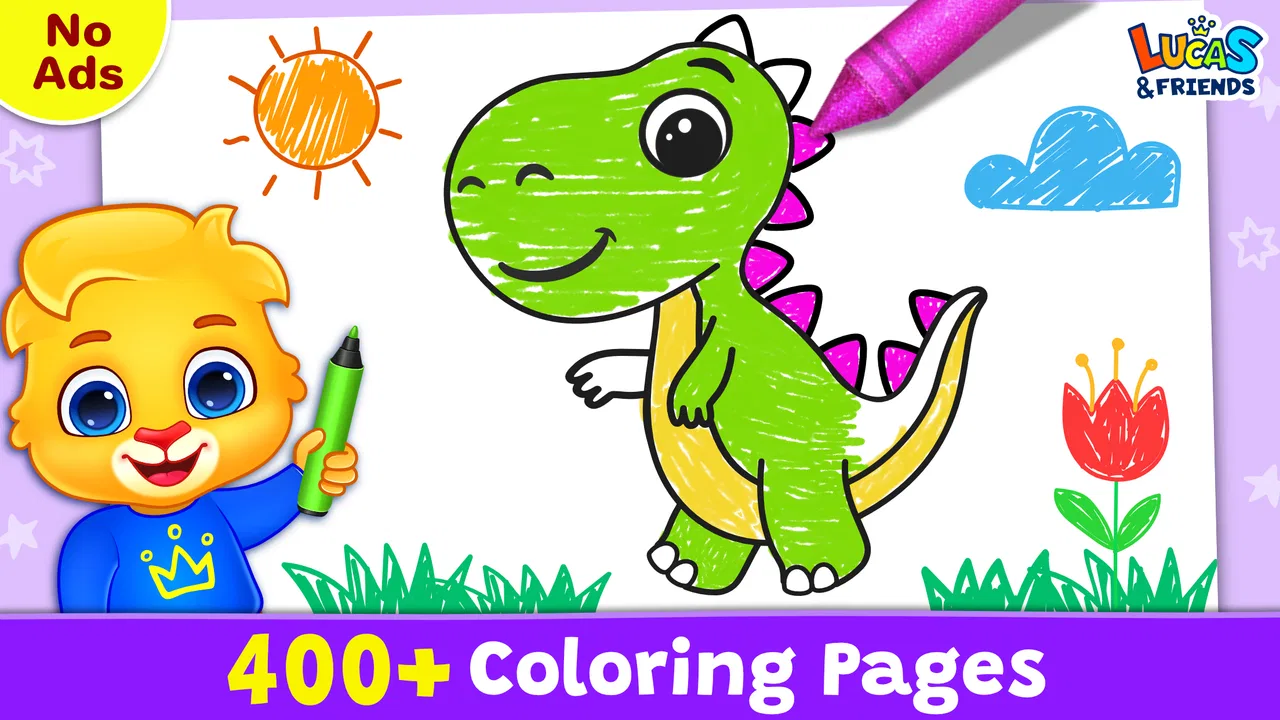
Coloring Games: Color & Paint provides a wide range of features including a vast library of images to color, multiple brush types, and a palette of colors to choose from. The app also offers a zoom function for detailed work and a save option to capture your creations. Additionally, it offers relaxation music to enhance the coloring experience.
02Is Coloring Games: Color & Paint suitable for all ages?
Yes, Coloring Games: Color & Paint is designed for users of all ages. The app includes a variety of images suitable for children, as well as more complex designs for adults. The user-friendly interface makes it easy for everyone to enjoy, regardless of age or artistic ability.
03Does Coloring Games: Color & Paint require an internet connection?
Coloring Games: Color & Paint can be used offline, allowing you to color and paint without needing an internet connection. However, you will need to connect to the internet to download additional image packs or updates, and to access any online features or sharing options.
04Are there any in-app purchases in Coloring Games: Color & Paint?
While Coloring Games: Color & Paint is free to download, it does offer in-app purchases. These purchases may include additional image packs, premium brushes, or ad-free experiences. It's important to review these options and set parental controls if children are using the app.
05How does Coloring Games: Color & Paint help in stress relief?
Coloring Games: Color & Paint is designed to be a calming and relaxing experience. The app includes soothing background music and a variety of images that encourage mindfulness and creativity. Users often find that focusing on coloring helps reduce stress and anxiety, providing a peaceful escape from daily pressures.
Pros
- Wide variety of coloring pages available.
- User-friendly interface for all ages.
- Offline mode for uninterrupted play.
- Regular updates with new designs.
- Supports multiple coloring tools.
Cons
- Contains ads that can be intrusive.
- Limited free content without purchases.
- Occasional app crashes reported.
- In-app purchases can be costly.
- No option to print completed art.

Coloring Games: Color & Paint
Gallery